Notepad Writer: A Fresh Take on Casual Handwriting for Designers
There’s something about the look of real handwriting that instantly adds a layer of personality to a project. It feels human, immediate, and full of character. For designers, capturing that authentic feel without sacrificing clarity or professionalism is a common goal. This is where a well-crafted handwritten font like Note Pad Writer becomes an invaluable tool. It’s not about mimicking a child’s scrawl or an overly formal calligraphy; it’s about embracing the clean, relaxed rhythm of everyday penmanship. The font captures the essence of writing a quick note on a legal pad or jotting down thoughts in a personal journal, making it a versatile asset for a wide range of creative work.
The Anatomy of a Modern Handwritten Font
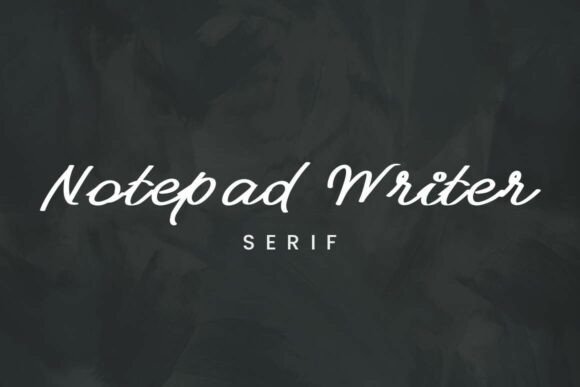
What sets Note Pad Writer apart in the crowded field of script fonts is its deliberate design for clarity and consistency. Many handwritten typefaces can feel chaotic or difficult to read at smaller sizes. This font takes a different approach. Its thin, consistent stroke weights create a minimalist and approachable aesthetic. You get the warmth and personality of a handwritten style without the visual noise that can undermine legibility. This makes it an exceptionally practical choice for designers who need a font that communicates a friendly, authentic tone while remaining easy on the eyes across various applications.
The overall personality of the typeface is one of effortless charm. It doesn’t try too hard. The letterforms flow with a natural, slightly imperfect rhythm that feels genuine, like a friend’s handwriting. This quality makes it particularly effective for projects aiming to build trust and connection with an audience. It’s a creative font that feels familiar and welcoming, avoiding the stiffness of traditional serif or sans serif fonts while maintaining a polished, professional edge. This balance is key to its broad appeal.
Practical Applications: Where This Font Truly Shines
Understanding a font’s strengths is one thing; knowing where to apply them is another. Note Pad Writer excels in scenarios where you want to inject personality and directness into your message. Think about branding for small businesses, especially those in the lifestyle, artisanal, or wellness spaces. It’s perfect for a bakery’s logo design, a yoga studio’s class schedule, or a handmade jewelry brand’s packaging design. The font helps establish a brand identity that feels personal and crafted, not corporate.
In editorial design and publishing, it serves as a fantastic display font for headlines, pull quotes, or chapter titles in a cookbook or a personal essay collection. It adds a touch of authorial voice. For digital creators, it’s a gem. Use it in social media graphics to create quotes that stand out, for Instagram story templates that feel personal, or for website banners that welcome visitors with a casual, friendly vibe. Its clean structure ensures it renders well on screens, maintaining its charm from desktop to mobile.
- Branding & Logo Design: Ideal for creating a warm, approachable logo for cafes, boutiques, consultants, and creative studios.
- Packaging & Labels: Adds a handcrafted, artisanal quality to product labels for food, cosmetics, and crafts.
- Web Design: Use for call-to-action buttons, feature quotes, or header text to break up rigid digital layouts.
- Social Media & Marketing: Creates engaging, personal-feeling graphics for posts, stories, and email newsletter headers.
- Editorial & Publishing: Perfect for book covers, magazine callouts, and internal design elements in lifestyle publications.
Integrating Note Pad Writer into Your Design Workflow
Choosing a font is just the first step. Effective integration requires thoughtful consideration. Start by evaluating your project’s tone. Is your brand voice conversational, supportive, and authentic? If so, Note Pad Writer is likely a strong fit. For projects requiring high formality or complex data display, a more neutral serif or sans serif font would be a better primary choice, with this script font used sparingly for accents.
One of the most important aspects of using any display or script font is pairing it effectively. A strong font pairing creates contrast and hierarchy. Note Pad Writer pairs beautifully with clean, geometric sans serif fonts or simple, modern serif fonts. For example, using it for a headline with a font like Montserrat or Lora for body text creates a balanced and readable layout. Avoid pairing it with other highly decorative or script fonts, as this can create visual competition and reduce overall legibility.
Before finalizing your design, always test the font in context. Check its readability at the actual size it will appear in your web design or on your printed material. Review the included character set—does it have the punctuation, numerals, and language support you need? For any commercial project, ensure you have the correct commercial license for the font. Using a premium font with clear licensing protects your business and ensures you’re supporting the creators who craft these essential design assets.
Ultimately, Note Pad Writer is more than just another handwritten font. It’s a strategic design tool for building visual warmth and human connection. By thoughtfully applying its clean, casual style, you can elevate your brand identity, make your marketing more relatable, and create layouts that feel both personal and polished. It proves that in modern typography, sometimes the most powerful designs are the ones that feel the most human.